Nokia 1280 Launcher: Features, How to Use It, and Complete Guide
Do you remember the old Nokia phones that had a small screen, physical buttons, simple menus, and the famous classic ringtone? For many people, those phones are connected with childhood memories. Before smartphones became a big part of our daily life, Nokia phones were everywhere.
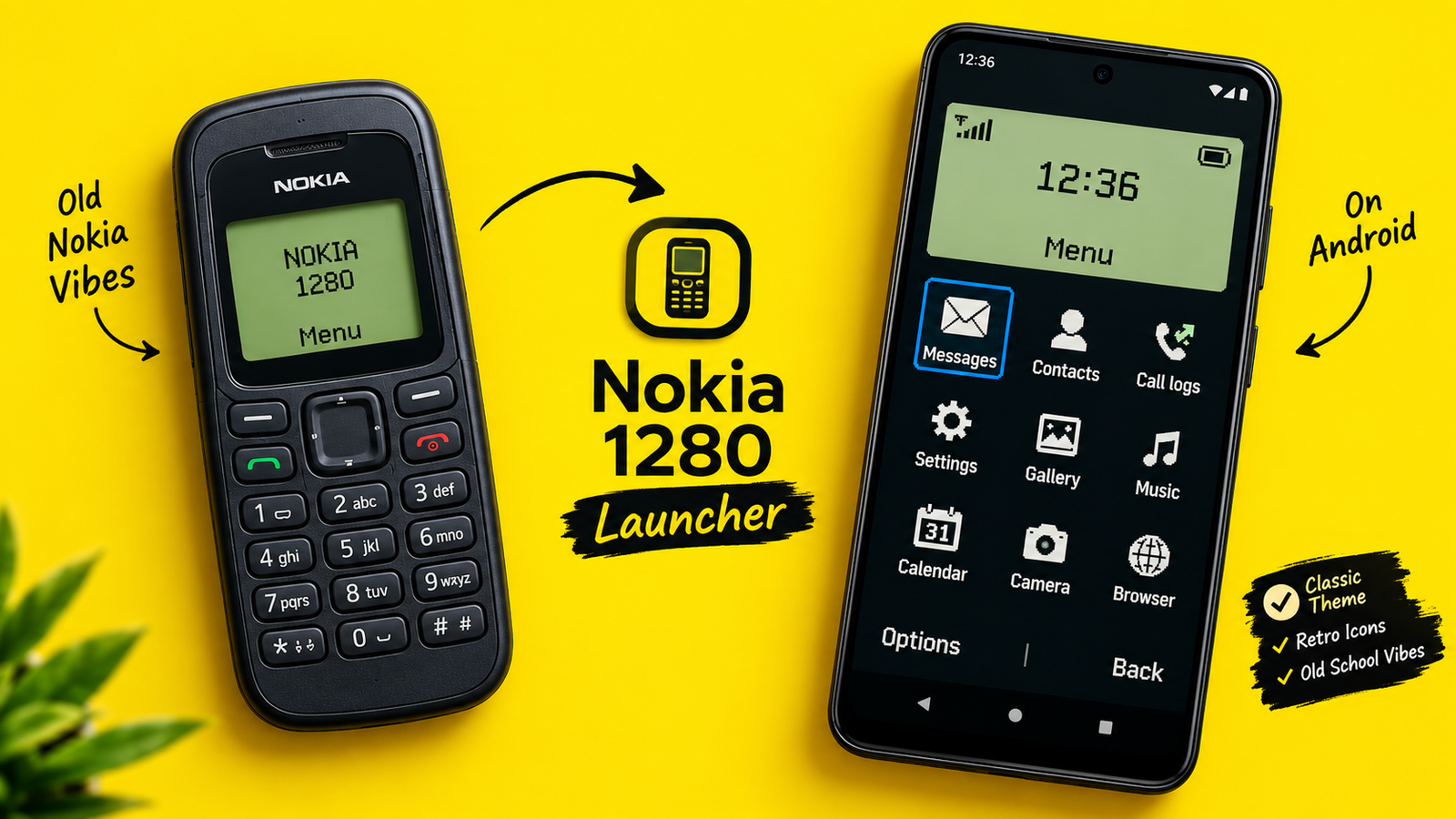
If you miss that old phone experience, Nokia 1280 Launcher is an interesting Android app to try. It gives your modern smartphone a retro look inspired by classic Nokia phones. Instead of using the usual Android-style home screen, the launcher changes the appearance and gives you a more traditional phone-like experience.
The app is developed by UniTiki and is available on Google Play. It is listed under the Personalization category and contains ads. The developer also clearly says that the app is a fan-made application and is not officially connected with Nokia Corporation. Google Play
What Is Nokia 1280 Launcher?
Nokia 1280 Launcher is an Android launcher designed for people who like the look of old Nokia phones.
A launcher normally controls the home screen of your Android phone. It can change the way your apps, icons, menus, and other elements appear. This particular launcher takes that idea in a different direction.
After setting it up, your phone can look much more like a classic Nokia device. The interface uses a retro design, Nokia-inspired themes, wallpapers, icons, and other visual elements.
The main attraction is not about making your phone more powerful. It is about changing the experience.
You can still use your Android smartphone and its normal apps, but the home screen gives you that old-school feeling.
According to the Google Play listing, the app has more than 5 million downloads and a rating of around 3.8 stars from more than 13,000 reviews. Google Play
Main Features of Nokia 1280 Launcher
1. Classic Nokia-Inspired Design
The biggest reason people install this launcher is its retro design.
The interface tries to recreate the simple appearance of old Nokia phones. Instead of a modern smartphone look filled with colorful icons and widgets, you get a much simpler style.
For someone who used a Nokia phone years ago, opening the launcher can feel surprisingly familiar.
2. Retro Themes
The launcher provides different Nokia-style themes that can change the appearance of your phone.
You can choose a style that matches your personal taste. The idea is to make your smartphone feel less like a modern Android device and more like an old classic phone.
This is especially fun if you enjoy vintage technology or simply want something different from the usual Android themes. Google Play
3. Wallpapers and Icons
Another useful feature is customization.
The app includes classic-style wallpapers and icons. These small details make a big difference because the launcher is trying to recreate the complete visual feeling of an older phone, not just change the home screen background.
You can adjust the appearance according to the options available inside the launcher.
4. Classic Ringtones and Sounds
The retro experience is not only visual.
The app also includes classic-style ringtones and sounds. When combined with the old-school interface, these sounds can make the phone feel even more nostalgic.
For people who remember using button phones, this is probably one of the most enjoyable parts of the experience.
5. Simple Navigation
Modern smartphones can sometimes feel complicated because there are so many options on the screen.
Nokia 1280 Launcher goes in the opposite direction. It focuses on a simple interface and easy navigation.
The launcher is designed to make the important parts of the phone easy to access without filling the screen with unnecessary elements. Google Play
6. Personalization Options
You can personalize different parts of the launcher, including themes, wallpapers, icons, and other visual elements.
This means two people do not necessarily have to use exactly the same setup.
You can create a retro phone style that feels more personal to you.
7. Android App Access
Although the launcher looks like an old phone, you are still using an Android smartphone underneath.
You can continue using your installed Android applications. The launcher mainly changes the way you interact with the home screen and the overall appearance.
This combination is what makes the app interesting. You get modern smartphone functionality with a classic phone-style interface.
How to Use Nokia 1280 Launcher
Using the launcher is fairly simple, especially if you have used an Android phone before.
Step 1: Install the App
First, open the Google Play Store and search for Nokia 1280 Launcher.
Check that the developer is UniTiki before installing it. You can also use the Google Play listing you shared earlier.
The app is currently listed for Android devices and has a 3+ content rating. Google Play
Step 2: Open the Launcher
After installation, open the app.
You will see the Nokia-inspired interface. Take a little time to explore the screen because the layout may feel different from the normal Android launcher you are used to.
If you have never used a retro launcher before, the first few minutes can feel slightly unusual.
Step 3: Explore the Settings
Go through the launcher settings and look at the available customization options.
Depending on the version of the app, you may find options related to themes, wallpapers, icons, phone appearance, sounds, and other settings.
Do not worry if everything does not look familiar at first. The whole point of the app is to provide a different style of navigation.
Step 4: Choose a Theme
Pick the theme you like the most.
A classic Nokia-style theme can make the biggest difference to the overall experience. Try a few available options and see which one feels most natural.
Step 5: Customize the Look
Now you can adjust things such as the wallpaper, icons, ringtone, or other supported personalization settings.
This is where you can make the launcher feel like your own retro phone instead of simply using the default setup.
Step 6: Start Using Your Phone
Once everything is ready, simply use your phone normally.
You can open your apps, check messages, make calls, use the camera, and perform other regular smartphone tasks. The main difference is that the home-screen experience has a classic Nokia-inspired appearance.
Is Nokia 1280 Launcher Worth Trying?
That depends on what you want from a launcher.
If you want a modern launcher with lots of productivity tools, widgets, advanced customization, and a highly modern interface, this may not be the best choice.
But if you enjoy old phones, retro designs, or simply want to make your smartphone look different, it can be fun.
One thing to remember is that the app contains ads, as shown on its Google Play listing. Also, recent user reviews mention some issues such as occasional delays when opening apps or returning to the home screen. Some users have also asked for more advanced keypad-style features. Google Play
So, the experience may not be perfect for everyone.
Who Should Use This Launcher?
Nokia 1280 Launcher is mainly suitable for people who enjoy nostalgia.
It can be a good choice if you:
- Miss classic Nokia phones.
- Like simple and clean interfaces.
- Enjoy retro technology.
- Want to give your Android phone a completely different look.
- Like experimenting with Android launchers.
- Want a phone that reminds you of the early mobile-phone era.
It may also be interesting for younger users who never experienced old Nokia phones and want to see what that style was like.
Final Conclusion
Nokia 1280 Launcher is a simple but interesting Android personalization app. Instead of trying to make your phone look more futuristic, it takes you in the opposite direction.
Its main attraction is the classic Nokia-inspired design. With retro themes, wallpapers, icons, sounds, and a simple interface, the launcher tries to bring back the feeling of using an old button phone. Google Play The best part is that you do not have to give up your Android smartphone to enjoy the experience. You can keep using your modern apps while changing the way your phone looks and feels.
Of course, it is not perfect. Ads are included, and some recent reviews mention occasional performance or navigation problems. So, users should keep their expectations realistic.Overall, if you are a fan of classic Nokia phones or simply want to add some nostalgia to your Android device, Nokia 1280 Launcher is worth checking out. It is less about adding powerful new features and more about bringing back a feeling that many people remember from the early days of mobile phones.Sometimes, that simple old-school feeling is exactly what makes an app enjoyable.