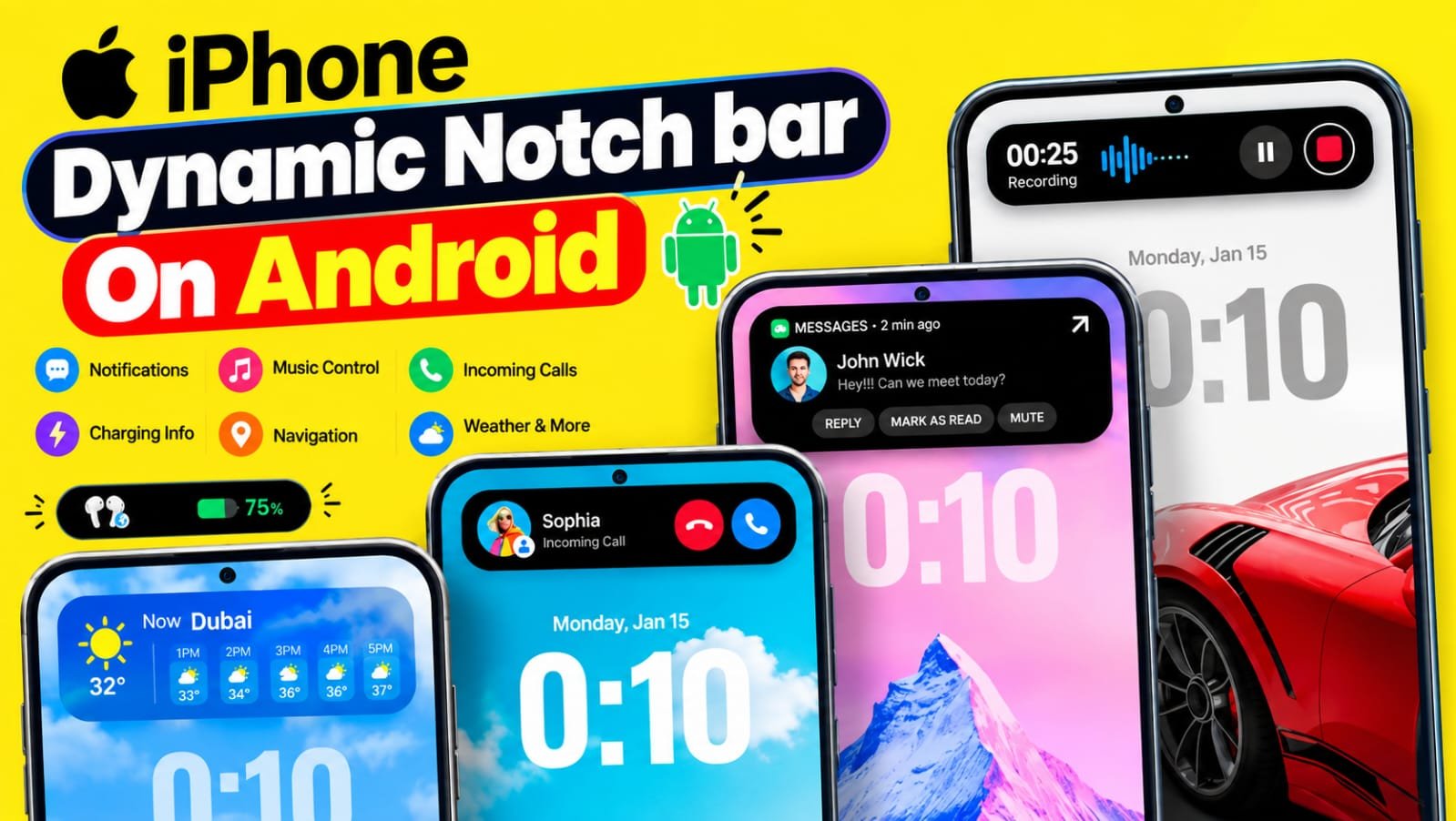
Dynamic Notch Notification Bar on Android
Many Android phones already have a good notification system. Still, sometimes the normal notification popup can feel a little boring. This is where Dynamic Notch Notification Bar becomes interesting. The app brings an iPhone inspired Dynamic Notch style experience to Android phones. It creates a small interactive area on the screen where users can see notifications, music information, calls, charging status and other useful updates.
It is not the real iPhone Dynamic Island. Instead, it uses an Android overlay to give a similar type of experience. The app can also be customized according to the phone and personal preference.
At the time of writing, the app has more than 5 million downloads on Google Play and has a rating of around 4.7 stars from more than 200,000 reviews.
What is iPhone Dynamic Notch Bar !
If you have ever used a newer iPhone, you may have noticed the small pill shaped area around the front camera. Apple uses this area for notifications and different live activities.
For example, when music is playing, information can appear around this area. Calls and other activities can also use the same space. This makes the top part of the screen more useful instead of keeping it as an empty camera area. This design became popular because it looks simple but feels interactive.
Android phones come with different camera cutouts. Some have a small punch hole in the middle. Some have it on the side. Some phones have a completely different design. Because of this, Android does not have one single Dynamic Island experience that works in exactly the same way on every phone. The Dynamic Notch Notification Bar app tries to bring a similar experience to Android. It creates a virtual notch style area on the screen and displays useful information inside it.
The interesting part is that you are not changing your phone into an iPhone. Your Android phone remains an Android phone. The app simply adds a new notification and interaction style on top of the existing system. You can tap the small popup to expand it and see more information. Depending on the feature, you can also interact with the notification without opening the complete app. This can be useful when you are watching a video, playing a game or doing something else on your phone.
Why people want to use this on Android phone ?
The biggest reason is the look.
Many Android users like the clean notification style found on iPhone. They may not want to change their launcher or install a complete iOS theme. They only want that small Dynamic Island type experience.
This app gives them that option.
Another reason is convenience. Instead of opening the notification panel every time, important information can appear in the Dynamic Notch area. You can quickly check what is happening on your phone.
Imagine that you are listening to music while using another app. The music information can appear inside the notch area. You can see the track information without completely leaving your current screen.
The same idea works with incoming calls, charging status and notifications.
The visual effect is another reason people may enjoy it. The small animated popup makes the phone feel a little different. Even an older Android phone can get a more modern looking interface with the help of this type of app.
There is also a customization side.
The app allows users to change different parts of the notch. Its Google Play listing mentions options for changing the notch position and direction. Users can also customize font style, font color, font size and the notch background.
This is useful because every Android phone has a different screen and camera position. A fixed design may not look good on every device. Instead, you can adjust the position until it looks natural on your phone.
So the main attraction is not only the iPhone style. It is also the ability to make the notification area fit your own phone.
How To Use iPhone Dynamic Notch Bar App on Android
Using the app is quite simple, but the first setup needs some attention.
First, install Dynamic Notch Notification Bar from Google Play. After opening the app, you will see the setup options. Follow the instructions shown by the app.
The app needs certain permissions to provide its main features. Its Play Store listing mentions Notification Access and Accessibility Service among the permissions required for displaying the Dynamic Notification Bar.
Notification access is important because the app needs to know when a new notification arrives. This allows it to show supported notifications inside the Dynamic Notch area.
Accessibility Service is used by the app to display and manage the Dynamic Notification Bar experience. Because this is a powerful Android permission, users should always understand what permission they are giving before enabling it.
After completing the required setup, you can enable the Dynamic Notch Bar.
Now you can adjust its position according to your phone’s camera cutout. If the notch looks slightly too high, low, left or right, use the customization settings to move it.
You can also change the width and appearance according to your preference.
Once everything is configured, try playing music or connect your Bluetooth earbuds. You may see information inside the Dynamic Notch.
You can also test it by sending yourself a notification or making a phone call.
The exact experience can be different depending on the Android version, phone model and permissions available on the device. So if one feature does not behave exactly like an iPhone, it does not necessarily mean that the app is not working.
It is an Android app creating an iPhone inspired interface. It is not replacing the actual iPhone system.
iPhone Dynamic Notch Bar App Features
The biggest advantage of Dynamic Notch Notification Bar is the number of things it can display.
Dynamic Notifications
Notifications are one of the main features of the app.
Instead of depending only on the traditional Android notification popup, supported notifications can appear through the Dynamic Notch interface.
You can tap the small popup to expand it and check more information. The app also supports notifications from social media and messaging apps depending on the device and notification settings.
This makes the top part of the screen more useful.
Music Information
If you regularly listen to music on your phone, this feature can be useful.
The Dynamic Notch can show track information while music is playing in the background. The app listing also mentions album art and a blurred background for the music view.
You can tap the small music area to get a larger view and interact with the available controls.
It gives the music player a more modern look.
Incoming Call Display
The app can also show phone call information through the Dynamic Notch style interface.
Instead of always depending on the normal call popup, the call information can appear in a compact area.
This can be useful when you are already using another application and want a less distracting call notification.
Charging Animation
Charging is another feature that makes the app visually interesting.
When you connect your charger, the Dynamic Notch can show charging information through an animation. The app listing also mentions charging animations as one of its main features.
For people who like customization, this can make something as simple as plugging in a charger look more attractive.
Bluetooth Device Information
The app can display information about connected Bluetooth and wireless devices.
For example, when you connect compatible earbuds, smartwatch or another Bluetooth device, related information can be shown through the Dynamic Notch.
The listing also mentions battery percentage information for connected wireless devices.
This can be handy if you want to quickly check the status of your connected accessories.
Weather Updates
Weather information can also be displayed inside the Dynamic Notch.
The app listing says it can provide live weather updates and can change themes based on real time weather conditions.
This is a nice addition because you can get basic weather information without opening a separate weather application.
Navigation Information
The app also supports map navigation information inside the notch.
This means navigation related information can be shown through the Dynamic Notch while you are using maps.
For someone who frequently uses navigation, having important updates in a small area can be more convenient than constantly checking the full map screen.
Different Notch Themes
One of the fun parts of this app is customization.
You do not have to keep the same Dynamic Notch design all the time. Different notch themes are available, so you can choose a style that matches your phone.
This is especially useful for people who enjoy changing the appearance of their Android phone.
Font and Color Customization
The app also gives control over the text.
You can change the font style, font color and font size. The notch background can also be customized.
There are options to configure the notch background and text color for specific apps as well.
These small settings can make a big difference. A notch that looks good on one phone may look different on another. Customization helps users find a better match.
Position and Direction
Not every Android phone has the camera cutout in the same place.
That is why the position option is important.
The app allows users to change the direction and position of the Dynamic Notch on the screen.
You can move it until it sits properly around your phone’s camera area.
Live Activities Style Experience
The app also includes a Live Activities feature.
According to the Play Store description, users can open supported favorite apps directly from the popup. This makes the Dynamic Notch more than just a visual decoration. It can work as a small interaction point on the screen. Recent updates have also added features such as live baseball scores, food delivery actions, improved notification ordering, foldable device support and a new Bluetooth small notch.
Conclusion
Dynamic Notch Notification Bar is an interesting option for Android users who like the Dynamic Island style of iPhone. It does not turn an Android phone into an iPhone. Instead, it adds a virtual Dynamic Notch experience over the Android interface. The best part is that it is not limited to one simple animation. It can handle notifications, music information, calls, charging animation, Bluetooth device information, weather, navigation and other updates.
The customization options also make the app more useful. You can change the notch position, direction, theme, font and colors according to your phone. There is one important thing to remember. The app needs permissions such as notification access and accessibility service for its main functions. These permissions should be enabled carefully and only if you are comfortable with them. The Google Play listing currently says that the developer declares no data shared with third parties and no data collected, while also stating that data is not encrypted. Overall, if you want to try an iPhone inspired Dynamic Notch experience without changing your Android phone completely, this app is worth checking out. The experience will depend on your phone model and Android version, but the idea is simple. It takes the empty space around the front camera and turns it into a more useful and interactive notification area.